Try the Best Music Converter Now!
100% Secure. No virus.
100% Secure. No virus.
Share this article:


You may find a perfect video from YouTube and want to copy it – not just grab a URL but download the full footage offline forever, no matter for watching on a long flight, or use it to create a personalized project, like an AI-generated short video. While YouTube makes it easy to copy a video link, copying the video itself requires a more robust approach. So, how can you copy a video from YouTube? The first task has been to solve the issue of downloading YouTube videos. We will guide you to copy and download YouTube videos to your computer in the post!
For the entire video content, you can download YouTube videos via YouTube Premium. The official allows Premium users to watch and download ad-free videos in the app. But notes that all downloaded videos are cache files owned by the platform, which can't be played in other apps. The output image quality is limited to 1080p or lower, even though the original 4K YouTube videos.
You have access to those videos in the case of connecting to the internet every 30 days. Besides, you can download videos on up to 10 different devices. Of course, you have the right to cancel the authorization and replace devices 4 times per year.
As we can see, there are several limitations to downloading YouTube videos in the official app. A better way is to look for a professional YouTube downloader to finish the task. Read on to the next part!
Note
If you wonder how to copy a YouTube video link, you can click Share > Copy or directly right-click on the video player and choose Copy link address.
StreamByte for video is a do-it-all video downloader software designed for various mainstream video platforms. It supports removing DRM encryption and regional copyright restrictions and downloading your preferred videos from YouTube with no complex operations. You can enjoy high-definition videos while keeping lossless audio quality and multi-language soundtracks. Not only does it meet your different needs for HD quality, but the tool also allows transferring YouTube videos to popular formats like MP4, MKV, MOV, etc., to be compatible with all kinds of devices.
You can search, watch, and batch-download YouTube videos in its embedded web player at a fast speed, instead of installing other software on your computer.
100% Secure. No virus.
100% Secure. No virus.
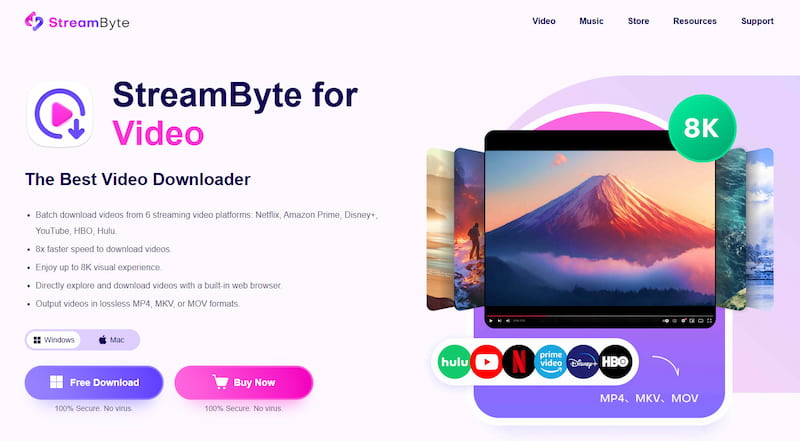
Key Features
How to download videos from YouTube on a Mac/PC via StreamByte?
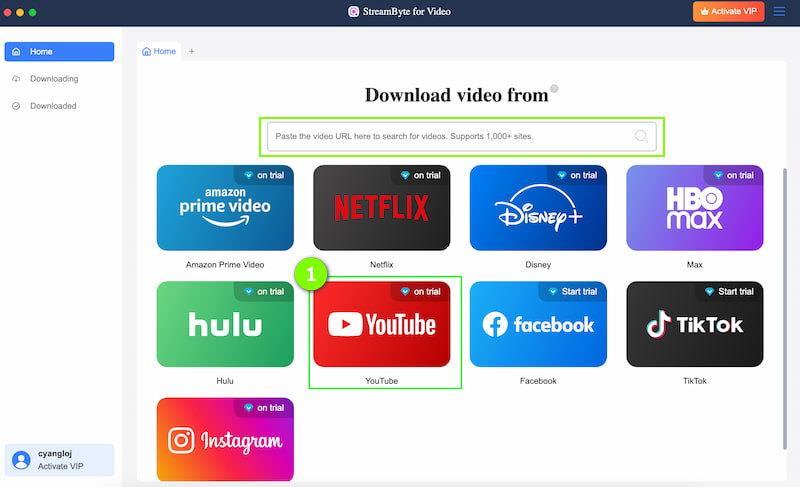
Step 1. Open and log in to the program and choose YouTube on the main interface. If you have already chosen a target video, you can also copy and paste the YouTube video into the search box.
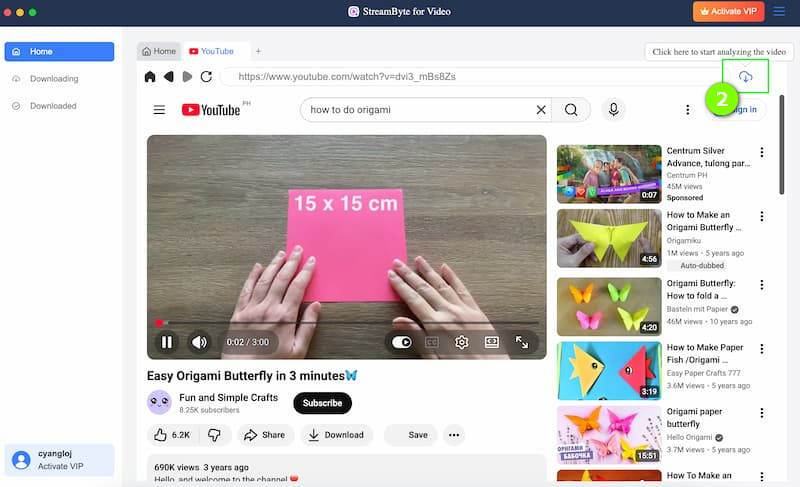
Step 2. In the YouTube web browser, you can search for the video you would like to save. Play it and click Download in the top-right corner of the screen.
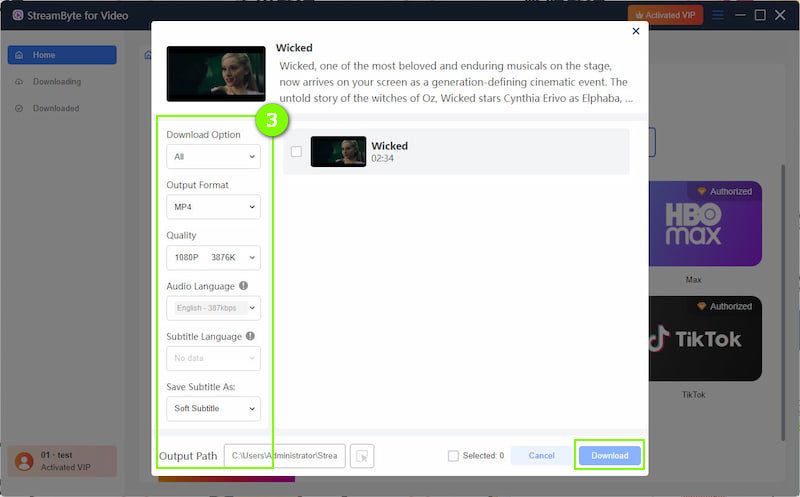
Step 3. The software will analyze the video. At the pop-up window, choose the output format and customize other settings. After it's done, you can download 4K YouTube videos to your computer.
User Review
StreamByte for video is an effective desktop software for downloading YouTube videos! I can save many clips in one go in less time. Its rich customizations make me take full control of the video quality, audio tracks, and subtitles. Satisfied!
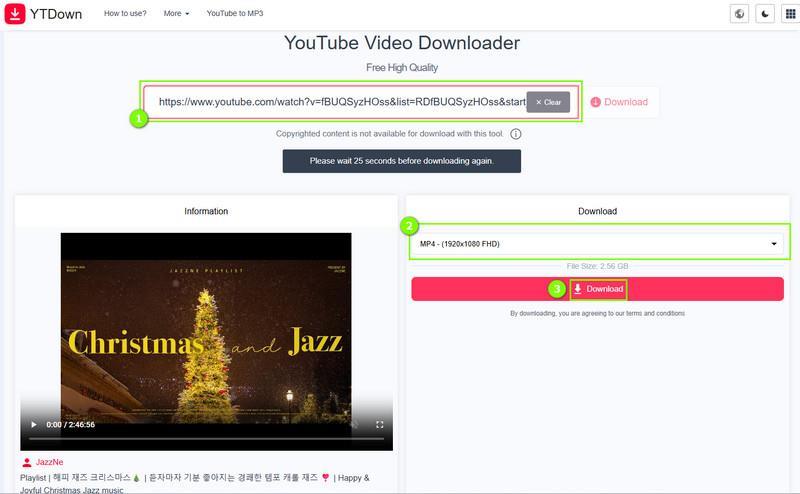
YTDown, a free YouTube video downloader compatible with all computers and mobiles, allows you to preserve videos from YouTube with a simple copy and paste. It supports downloading files to MP4 (up to 1080p), M4A, and MP3. The interface is clear and simple for beginners to extract YouTube audio/video in an emergency.
Pros:
Cons:
How to use it to download YouTube videos?
Step 1. Copy the video URL from the YouTube app or its web page.
Step 2. Move to the website (https://app.ytdown.to/en23/) and enter the YouTube link.
Step 3. Select the desired quality and download it directly to your device.
User Review
I have successfully downloaded YouTube videos on my macOS Mojave. 10.14.6 using it, but the image quality has been compressed. However, the downloading did not go smoothly everywhere. When I paste a link to it, the interface always shows 'Missing or invalid YouTube URL' or 'The system is currently undergoing scheduled maintenance to improve performance and security'!
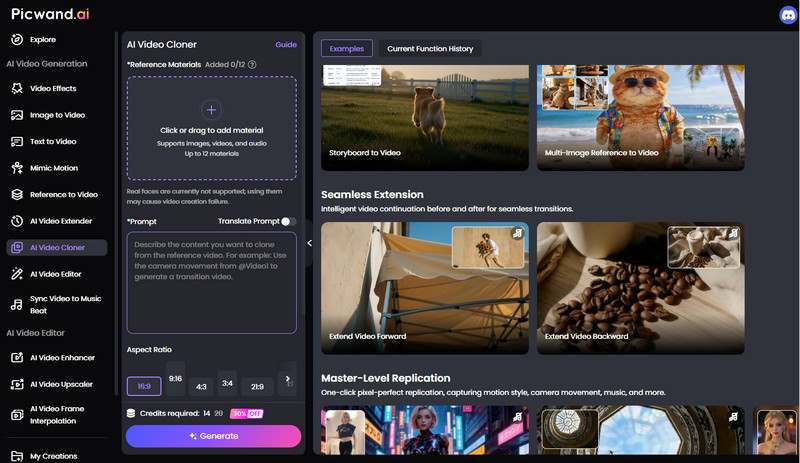
Downloading the video is the beginning of your creative process. Now we can proceed to the last step to copy videos from YouTube. If you want to imitate a certain video style or replicate a viral video, it's time-consuming and tedious to master or clone the condensed elements manually. Picwand AI Video Cloner simplifies the task and helps you to recreate high-quality video content into a unique version.
You can serve the tool as an ultimate toolkit for video creators! It is designed by Picwand AI, focusing on one-click cloning and intelligent generation for short video creation and other scenarios. You can upload a reference video or image, and then the AI-powered tool will automatically analyze the rhythm, transitions, camera language, and visual style from it and replicate actions, effects, and other elements from the video.
Plus, for a more detailed adjustment, you can describe what you want to clone or enhance, and the program will understand your prompt to make a creative edition. Don't worry about some fake looks - the AI-powered replicator keeps key elements from the video and provides a natural and realistic viewing experience to avoid distorting the quality of the picture.
Q1: Is it legal to copy videos from YouTube?
A: Depends on. Be strict, YouTube Terms of Service claims that users are not allowed to reproduce, download, distribute, transmit, broadcast, display, sell, license, alter, modify, or otherwise use content without the permission of the official or the creator. However, copying videos for personal use is usually permitted in some regions by default. Please make sure that you will not use these contents for commercial purposes. Otherwise, you may break copyright laws.
Q2: Will copying a YouTube video reduce its original quality?
A: Before copying a video, you have to download the YouTube videos from the official site. Most online converters reduce the resolution and bitrate when converting YouTube to MP4. If you choose a professional tool, you will keep the original quality of the video files. We recommend that you use a reliable third-party tool from well-known brands, such as StreamByte for Video. For the copying process, you can use Picwand AI Video Cloner to mirror the effects from the videos. It supports 720p, 1080p, 2K, and 4K resolution output for most daily needs.
Q3: What is the difference between copy link and copy video from YouTube?
A: Copying a video link means to capture the URL address for sharing. But copying a YouTube video is a process that covers two essential parts: downloading and copying. You have to save the target video files to MP4 or other formats first, then replicate and adjust the style, key elements, video filters, and more into a new video.
Learning how to copy video from YouTube is for gaining the freedom to access, study, and innovate with digital content. If you want to mimic the style or clone the structure of a viral video, downloading high-fidelity local videos is just the foundation. Once you have the raw material, you can use an AI-powered video cloner to efficiently recreate and transform these copies with hot styles into unique content for your own channels.
All Music Converter
Best music converter to download music from multiple streaming media without losing quality.
Charlotte Taylor is a content creator specializing in evaluating and analyzing various video download tools. Concerned about the technological trends of mainstream platforms such as YouTube, HBO, and Hulu, she conducts in-depth research on the functionality, compatibility, and usage limitations of video downloaders.
With rich experience, she has written a number of practical tutorials and reviews, helping users choose the most suitable video storage solution. In content creation, she tends to be user-friendly and practical-oriented, and she does well in explaining technical details in a simple way. Whether you are an ordinary user or a beginner, you can receive reliable guidance from her posts.

Expert who supports offline music from streaming media.
SubscribeCopyright © 2026 StreamByte. All rights reserved.



Subscribe to get StreamByte upgrades, guides, discounts and more in the first moment.
Invalid Email Address.